

Open source
Accessibility profile
State what you need to read a screen once. Get a checked palette in every terminal and editor. Zacess Profile is the zprf command and a browser extension that read one open file format. Version 1.0.0.
The zprf command, from the zacess-profile crate, under the Apache License 2.0.
Needs first, palette second
zprf reads a small TOML file that describes needs: a contrast floor, a font and size, reduced motion, a cursor size, a focus ring, line spacing and a line length. It derives any colour the file leaves out, checks every foreground and background pair against WCAG 2.2, checks that neighbouring colours stay apart under simulated colour vision deficiencies and writes config files for Ghostty, kitty, WezTerm, Alacritty, tmux, Neovim and VS Code. A browser extension applies the same profile to every web page.
Every theming tool we know of stores colours. None of them stores needs. A person who needs 7:1 contrast, no blinking and a 16 point font has to find a theme that happens to meet the first need, then set the other two in every app by hand, then check nothing slipped when the theme changed.
Zacess Profile turns that round. The profile says what has to be true and the tool refuses to write anything that breaks it.
Needs first, palette second
A profile can be two lines long. Every colour it leaves out is solved in OKLCH to meet the profile's own floors.
Fails loudly
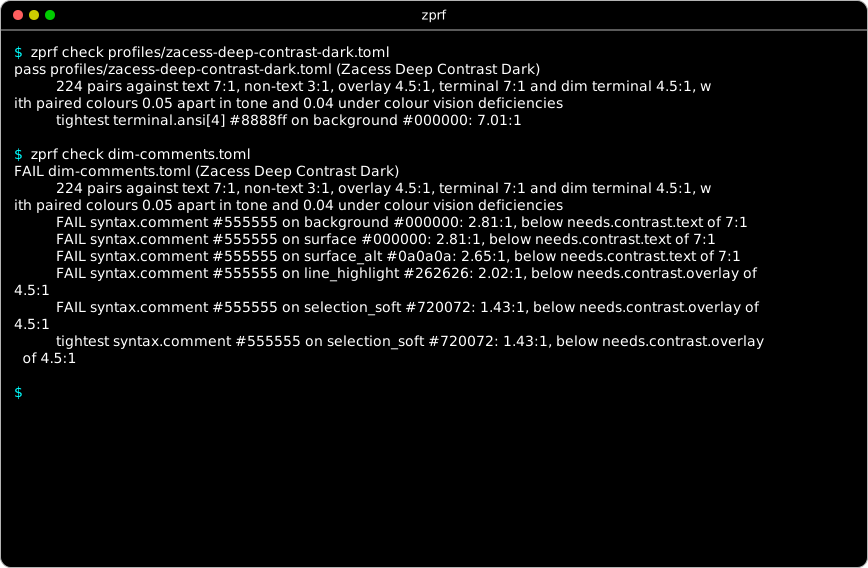
A pair below its floor is named with both colours, the measured ratio and the floor it missed.
renderwrites nothing until every pair passes.Distinct for every viewer
Neighbouring syntax colours, added and removed lines and errors and warnings must differ in tone and stay apart under simulated protanopia, deuteranopia and tritanopia, using the same rules as the Zacess themes.
More than colour
Font, size, line spacing, cursor size, focus ring, reduced motion, one column, no decoration and a line length ruler are written to each app that has a setting for them.
An open format
The profile is specified in spec/SPEC.md with a JSON Schema, versioned apart from the tool, so any app can read a profile without it.
How it works
Write down your needs
A profile is a small TOML file. It can be two lines long and may carry colours of its own. The format has a specification and a JSON Schema, so any app can read it.
Check every pair
zprf derivefills in each colour the profile leaves out.zprf checkmeasures every pair against the profile's floors and under simulated colour vision deficiencies.Write each app's settings
zprf renderwrites the files for each app into a folder you name. A profile that fails a pair is never written.
spec_version = 1
name = "Warm dark, large text"

[needs]
cursor_size = "large"
line_spacing = 1.3
column_width = 80

[needs.contrast]
text = 7.0

[needs.font]
family = "Atkinson Hyperlegible Mono"
size_pt = 18

[palette]
background = "#1b1612"
One colour set, the rest derived
This profile asks for 7:1 text contrast, an 18 point font, a large cursor, more line spacing and an 80 character line. It sets only the background. derive chooses every other colour to meet those floors and marks each one # derived, so your choices stay apart from the tool's.
zprf derive spec/examples/minimal.toml --out mine.toml
zprf check mine.tomlWhat is checked
Every pair is measured with the WCAG 2.2 contrast formula and held to a floor from the profile. The defaults follow the Zacess themes. A pair below its floor is named with both colours, the measured ratio and the floor it missed.
| Floor | Default | Pairs |
|---|---|---|
text | 7:1 | Text, muted text, links, errors, warnings, information and the accent on the background and on panels. Every syntax colour on the background and on panels. The cursor, the selected text, the text on the accent and the default text over the current line and a soft selection. The default text on any terminal slot listed as a background fill |
non_text | 3:1 | Borders and the focus ring on the background and on panels. The selection block against the background |
overlay | 4.5:1 | Every syntax colour over the current line and over a soft selection. Muted text, links, errors, warnings, information and the accent over the current line |
terminal | 7:1 | The sixteen ANSI colours on the background, apart from slots listed as background fills |
terminal_dim | 4.5:1 | ANSI slots a profile lists in palette.terminal.dim, which four of the light starter profiles use to keep their colours vivid |
highlight_distance | 0.08 | OKLab distance between the background and both the current line and a soft selection, so each stays visible |
colour_vision_distance | 0.04 | OKLab distance between paired colours under simulated protanopia, deuteranopia and tritanopia (Machado, Oliveira and Fernandes, 2009) |
tone_difference | 0.05 | Difference in tone, the cube root of relative luminance, between paired colours, so they differ with no colour vision at all |
check_error_warning | on | Whether errors and warnings are held to the two floors above as a pair |
apca | off | An optional APCA Lc floor for text on the background, checked on top of WCAG |
Seven targets
render writes only inside the folder given to --out. Copying a file into an app's config folder is a step you take yourself. Each rendered file says in its header how to load it.
| Target | App | File written | What it sets |
|---|---|---|---|
ghostty | Ghostty | ghostty/<id> | Palette, cursor, selection, minimum-contrast at the text floor, a block cursor kept through shell integration, cursor blink, font, size, cell height and a solid background |
kitty | kitty | kitty/<id>.conf | Palette, cursor, selection, tabs, borders, URL colour, a block cursor kept through shell integration, cursor blink, font, size, cell height, the focus border width, a one column layout and a solid background |
wezterm | WezTerm | wezterm/<id>.lua | Palette, tab bar, cursor style and blink, animation rate, font, size, line height and a solid background |
alacritty | Alacritty | alacritty/<id>.toml | Palette, cursor, selection, cursor shape and blink, font, size, line offset and a solid background |
tmux | tmux | tmux/<id>.tmux.conf | Status bar, windows, pane borders, messages, copy mode, clock and heavy borders for a wide focus ring |
neovim | Neovim | neovim/colors/<id>.lua | Editor, syntax, Tree-sitter, diff and diagnostic groups, terminal colours, cursor blink, a column ruler, stacked diffs and no see-through windows |
vscode | VS Code | vscode/<id>.settings.json | A settings.json fragment: interface and terminal colours, token colours with font styles, font, size, line height, cursor, reduced motion, rulers, editors and diffs in one column, no minimap and terminal.integrated.minimumContrastRatio |
Commands
Every command that writes or sends anything checks the profile first and stops on a failing pair.
| Command | What it does |
|---|---|
check <profile>... | Derives any missing colour, then checks every pair of every file given. --verbose lists every pair. --no-derive also fails a profile that leaves colours to derive |
derive <profile> | Prints the complete profile with every derived colour marked. --out <file> writes it instead |
render <profile> --target <name> --out <dir> | Writes <dir>/<target>/ from the templates. --target all writes every target |
apply <profile> --live | Sends OSC 4, 10, 11 and 12 to standard output, which recolours the terminal it runs in until the terminal is reset. --escaped prints them as readable text with nothing sent, with or without --live. --tmux wraps them for tmux passthrough |
watch <profile> --target <name> --out <dir> | Checks and renders the profile, then does it again each time the file changes. A profile named name-dark.toml or name-light.toml is paired with the other in the same folder (--variant names another) and the variant matching the system's light or dark setting is rendered. Both are written under the id without its ending, so an app can point at one file. A change that fails a pair is reported and the last good files are kept. --appearance dark or light pins one variant. Runs until Ctrl+C, which ends it the way Ctrl+C ends any command |
os <profile> --print | Prints the system accessibility settings the profile maps to: defaults write and defaults delete lines on macOS, gsettings set on GNOME and reg add values with their Settings page on Windows. A preview only. zprf never runs them and has no option to. --platform prints another platform's lines |
list-targets | Lists every target with the file it writes |
Starter profiles
Ten of the Zacess themes ship as complete profiles. Each one passes check with no colour left to derive. Start from zacess-deep-contrast-dark or any other and change what you need.
| Profile | Background | Text | Text contrast |
|---|---|---|---|
zacess-light | #ffffff | #111111 | 18.88:1 |
zacess-dark | #121212 | #f5f5f5 | 17.18:1 |
zacess-yellow-on-black | #000000 | #ffeb3b | 17.19:1 |
zacess-cream | #fdf6e3 | #000000 | 19.46:1 |
zacess-high-contrast-dark | #000000 | #ffffff | 21.00:1 |
zacess-high-contrast-light | #ffffff | #000000 | 21.00:1 |
zacess-deep-contrast-dark | #000000 | #ffffff | 21.00:1 |
zacess-deep-contrast-light | #ffffff | #000000 | 21.00:1 |
zacess-warm-dark | #211b17 | #e5d5b6 | 11.77:1 |
zacess-warm-light | #f4ead5 | #342410 | 12.50:1 |
See a starter profile
Each starter profile's file in an editor with what check prints in a terminal, both drawn in the profile's own colours, font size and cursor. Choosing a theme opens its starter profile.
Loading
Zacess Deep Contrast Dark
Browser extension
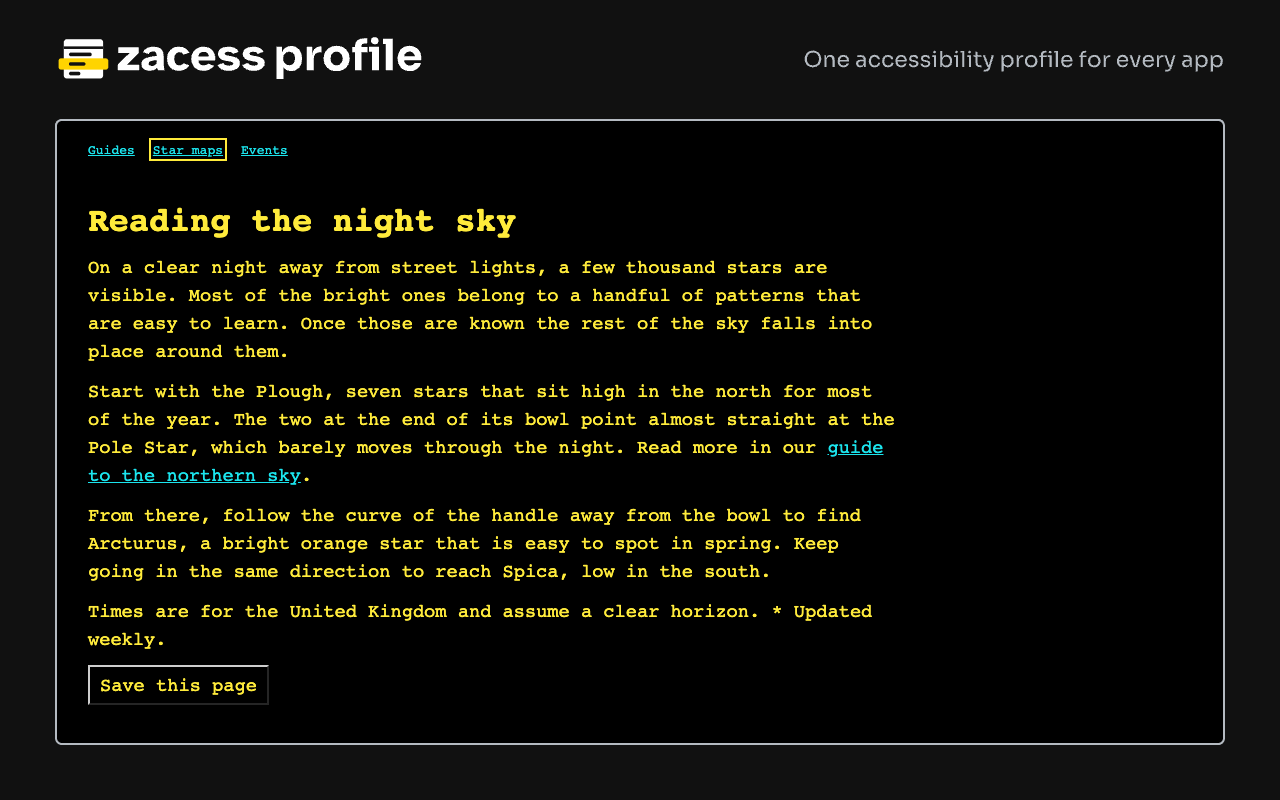
The extension applies a profile to every web page in Chrome, Edge and Firefox through CSS custom properties: colours, font, a minimum text size, spacing, line length, the focus ring and reduced motion. Its options page reads the same TOML and checks it against the JSON Schema.
Install it from the Chrome Web Store, Firefox Add-ons or Microsoft Edge Add-ons. To build it yourself, follow extension/README.md.
Nothing leaves the browser. The profile is kept on the device and the extension makes no network requests.
Accessibility
Zacess Profile exists so that a person's reading needs are written down once and kept everywhere.
Nothing below the floor
render,watchandapplyrefuse a profile that fails any pair, so nothing is written or sent. Printed ratios are rounded down and never overstate the real one.Colour is never the only signal
Paired colours must differ in tone as well as hue, so they stay apart with no colour vision at all. Every syntax colour keeps its font style in every target.
Reduced motion by default
A profile asks for no blinking cursors, animation, smooth scrolling or flashing bells unless it turns
reduce_motionoff.Your settings stay yours
renderandwatchnever edit an app's real config.os --printonly prints the system settings a profile maps to and has no option to apply them.
The full statement lists each need per app, the lowest measured value in every starter profile and the known limits. Read the Zacess Profile accessibility statement.
What comes later
- More targets, including JetBrains IDEs, Zed, Helix and Windows Terminal
- The extension talking to
zprf watchover native messaging, so one profile change reaches the terminal, the editor and the browser together - A Safari build of the extension
- Readers for the spec in other languages, starting from the TypeScript reader in the extension
- Spec version 1 marked final once the colour vision pairs have settled
Install
The tool is one program, zprf. Four routes, in the order the install page gives them, the shortest for each system first:
macOS and Linux with Homebrew
The formula installs the release build for the machine. The starter profiles land in
$(brew --prefix)/share/zacess-profile/profiles.brew install zacesshq/tap/zacess-profileWindows with winget
Pending review
The package is waiting for review in the winget community repository, so this command works once it is accepted. Until then, Cargo or a release archive works on Windows.
winget install Zacess.ProfileAny platform with Cargo
Needs Rust 1.88 or later. The crate on crates.io carries the code, the starter profiles and the spec.
cargo install zacess-profileFrom a release
Each build on the v1.0.0 release has a
.sha256file beside it. Each archive holdszprfwith the ten starter profiles, the spec and the accessibility statement. Check the sum, unpack the archive and putzprf(orzprf.exe) somewhere on yourPATH.Release builds for v1.0.0 System Build Checksum macOS on Apple silicon zacess-profile-v1.0.0-aarch64-apple-darwin.tar.gz SHA-256 macOS on Intel zacess-profile-v1.0.0-x86_64-apple-darwin.tar.gz SHA-256 Linux on x86-64, no shared libraries needed zacess-profile-v1.0.0-x86_64-unknown-linux-musl.tar.gz SHA-256 Linux on ARM64, no shared libraries needed zacess-profile-v1.0.0-aarch64-unknown-linux-musl.tar.gz SHA-256 Windows on x86-64 zacess-profile-v1.0.0-x86_64-pc-windows-msvc.zip SHA-256 shasum -a 256 -c zacess-profile-v1.0.0-aarch64-apple-darwin.tar.gz.sha256 tar -xzf zacess-profile-v1.0.0-aarch64-apple-darwin.tar.gzLinux checks the sum with
sha256sum -cand Windows compares the hash fromGet-FileHashwith the one in the.sha256file.Start
Check a starter profile, write its files into a folder of your choosing and list every target.
zprf check profiles/zacess-deep-contrast-dark.toml
zprf render profiles/zacess-deep-contrast-dark.toml --target all --out ./build
zprf list-targets
Guides
- Install Zacess Profile: every install route, the checksum steps, building from source and uninstalling.
- Quick start: check a starter profile, write its files and start a profile from needs alone.
- Writing a profile: the fields, the needs and the colours of a profile.
- Colour vision checks: tone difference, OKLab distance, the simulations and the paired colours.
- Load the files in each app: the line each app needs to load what render writes.
- System settings preview: what os --print maps each need to on macOS, GNOME and Windows.
- Troubleshooting: every message zprf prints and what to do about it.
- Accessibility of Zacess Profile: what the tool guarantees, each need per app and the known limits.
- Profile command line: every command with a page of its own for each.
- Profile format: the open specification every reader of a profile follows.