

Browser version
From Zacess main at 2bc7be2. Edit this page on GitHub
The first usable slice of Zacess in a web browser, to be hosted at app.zacess.com. The interface
lives in apps/web and the core reaches the browser through crates/zacess-wasm.
Done when
The slice is done when all of these hold. Testing with screen readers and with disabled students is the one item that cannot be checked here.
- A PDF, an image, a Word file (.docx), a web page (.html), a text or Markdown file or pasted text or web page HTML opens into a Zacess document, entirely on the device. A PDF page with no text layer and an image go through OCR. Doubtful words are marked exactly as the core marks them.
- Opening shows its progress in a polite live region and any failure as an alert that says what happened and what can be opened.
- The reading view is real HTML built by the core from the document (headings, lists, tables,
image descriptions and equations), with the app's lockup as the only
h1. - The core's presets and the controls for text size (up to 96 pt), line spacing, letter spacing, column width and colour theme change the reading view at once, are fully keyboard operable and are kept in this browser. The text reflows at every size and the page never scrolls sideways.
- A reading ruler follows the pointer, the keyboard focus and the sentence being read.
- Read aloud uses only voices that run on the device unless online voices are switched on by a clearly labelled setting. It has play, pause, stop, previous and next sentence and a speed control, highlights the sentence being read and starts from the paragraph last clicked or selected.
- Accessible HTML and EPUB 3 downloads come from the core, in the current reading profile.
- Links in a PDF, a web page, a Word file or a pasted address work as described under Links: real links, never shown by colour alone, listed in a panel, read with a cue and never fetched by the app.
- The app says once, in its footer, that every file is read in the browser and nothing is uploaded, makes no request to any other origin and keeps no account, cookie or analytics.
- axe-core finds no WCAG 2.2 A or AA violations on the main screens, in jsdom and in Chromium. It finds no AAA contrast violation in the reading view either. Every control is labelled, focus is always visible, there is a skip link and landmarks, colour is never the only signal, motion follows the reduced motion setting and the layout works at 320 pixels wide.
- Testing with VoiceOver, NVDA, JAWS, TalkBack and Orca and with students who use them is done by people with the assistive technology, before the first release.
Layout
| Part | What it shows |
|---|---|
| Header | The Zacess lockup, which links to zacess.com as "Zacess home", an "About Zacess" text link to the same site and the colour mode control, on one row from 320 pixels wide. Below 640 pixels the lockup is smaller and the link reads "About" (still named "About Zacess" for screen readers); below 375 pixels the colour mode button shows only its icon and keeps its spoken name |
| Colour mode | One button naming the current mode (System, Light or Dark) with its icon and a chevron. It opens a menu of the three modes with their icons. The chosen one carries a tick and is announced as checked. System is the default. The menu is a Radix dropdown with radio items: the arrow keys, Home and End move through it, Enter or Space chooses, Escape closes it and the focus returns to the button. The choice is kept under zacess.theme |
| Panel | Open a document, reading settings, read aloud and export. From 768 pixels wide (an iPad in portrait) it sits beside the document; on phones it comes before and after it |
| Read aloud bar | With a document open, Play (Pause or Resume once reading), Stop, Previous sentence, Next sentence, Speed and the status line sit in one bar above the document that stays at the top of the viewport while the document is on screen, so they are reachable without scrolling. Every button is at least 44 pixels square and named; below 640 pixels the button names are for screen readers only so the five buttons fit one row at 320 pixels wide. The bar comes before the document in the tab order. The focus stays on the button pressed (Play becomes Pause in place). The page scrolls only when the sentence being read leaves the viewport, by the least distance that brings it back below the bar. It never scrolls when the sentence is already in view. Scrolling is instant so it follows the reduced motion setting. The bar hides with the panel. Voice, online voices and web addresses stay in the panel |
| Hide panel | Once a document is open, a "Hide panel" button above the layout hides the whole panel so the document takes the full width. "Show panel" brings it back. The button carries aria-expanded and aria-controls, keeps the focus when pressed and works the same on phones. The choice is kept under zacess.panel. With no document open the panel is always shown. Progress messages and errors stay visible and announced while the panel is hidden. Nothing animates |
| Footer | The one statement of how files are handled, then the copyright line and the licence. A footer navigation links, in this order, to Docs, Privacy, Accessibility, Security and Contact on zacess.com and to the source code and the issue forms on GitHub. Every footer link leaves the app, carries rel="noreferrer" and is at least 44 pixels tall and wide |
Links to the website are plain navigation, so the Content Security Policy needs no change for them.
Architecture
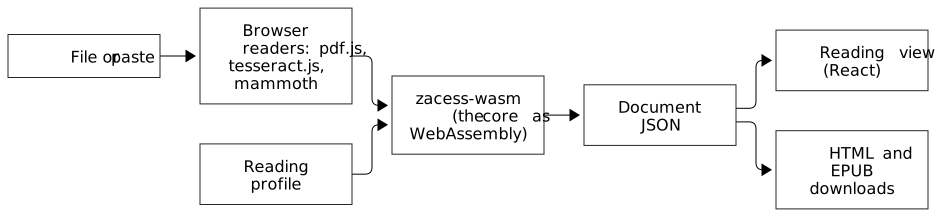
Diagram source, as text
flowchart LR
    File["File or paste"] --> Read["Browser readers: pdf.js, tesseract.js, mammoth"]
    Read --> Wasm["zacess-wasm (the core as WebAssembly)"]
    Wasm --> Doc["Document JSON"]
    Doc --> View["Reading view (React)"]
    Doc --> Export["HTML and EPUB downloads"]
Profile["Reading profile"] --> Wasm| Part | What it does |
|---|---|
crates/zacess-wasm |
Plain functions over strings and bytes (lib.rs, links.rs), tested natively, plus thin wasm-bindgen bindings (bindings.rs) built only for wasm32 |
| pdf.js | Reads each page's text layer as positioned text and its link annotations. Pages with no text are drawn to a canvas for OCR |
| tesseract.js | Recognises images and scanned pages in a worker, with a confidence for every word |
| mammoth | Turns a Word file into HTML, which the core reads with the universal capture HTML reader |
| The core | Lays out positioned text and OCR words with the same layout analysis as the desktop, reads HTML, text and Markdown, applies the reading profile and writes the exports |
| React, shadcn/ui on Radix, Tailwind | The interface, rendered as real HTML |
Every document and profile crosses the boundary in its documented JSON form
(document model, reading profiles). The reading view
uses the export's own markup in an <article> instead of <main>, with each heading one level
lower. The profile's style sheet is scoped to the view.
What the browser build leaves out
zacess-core has a default library feature that brings in the SQLite library store
(rusqlite). The browser build turns default features off, so it carries no SQLite and keeps
nothing on disk yet. The native build and every existing test keep the feature on and are
unchanged. The command line adapters (Tesseract, Poppler, liblouis, whisper.cpp) still compile for
WebAssembly, where starting a process is unsupported, so their detection finds nothing; the browser
build never calls them and the linker drops them.
WebAssembly in a browser has no clock, so the EPUB's dcterms:modified time is passed in by the
page through ExportOptions::modified.
Building
rustup target add wasm32-unknown-unknown
cargo install wasm-bindgen-cli --version 0.2.129   # must match the version in Cargo.lock
npm ci
npm run build -w apps/web    # the core, the OCR and PDF assets, a type check and the static dist
npm test -w apps/web         # Vitest, Testing Library and axe-core in jsdom
npm run check:browser -w apps/web # the built app in Chromium, after npx playwright install chromiumwasm-opt from Binaryen shrinks the core further when it is installed. npm run build writes a
static site to apps/web/dist that any static host can serve; public/_headers carries the same
security headers for Cloudflare Workers static assets.
Deploying
The browser version is served from app.zacess.com by Cloudflare Workers static assets, configured
in apps/web/wrangler.jsonc. No server code runs: Cloudflare serves dist with the _headers
rules and sends every unknown path to the app's single page.
cd apps/web
npm run build
npx wrangler deploy --autoconfig=falsePrivacy
- Files are read in the page and never uploaded. There is no account, no cookie and no analytics.
- The built page carries a Content Security Policy that allows scripts, styles, fonts, workers and
requests from its own origin only (
connect-src 'self'). The browser check records every request and fails if one leaves the origin. - The OCR worker, its WebAssembly engines and the English language data, the pdf.js worker, character maps, standard fonts and image decoders and the Atkinson Hyperlegible fonts are all served by the app itself. Nothing is loaded from a third-party CDN.
- tesseract.js keeps the language data in the browser's IndexedDB after the first use, so OCR works offline afterwards.
- Online voices are off by default. The setting that turns them on says that the text is sent to the company that provides the voice.
- Settings (the reading profile, the app colours, whether the panel is hidden, the voice, speed and
link reading) are kept in
localStorage. Every read and write is guarded so the app still works when storage is blocked.
More OCR languages
Only English is bundled (eng.traineddata.gz, the 4.0.0 best_int model, about 3 MB). Other
languages will be served from Cloudflare R2 under the app's own domain, since Workers static assets
cap a single file at 25 MiB. The app will offer a language list, download a language only when the person chooses
it and keep it in IndexedDB like English. The langPath the worker uses and the Content Security
Policy's connect-src will then name that R2 domain and nothing else.
Links
| Source | How links are found |
|---|---|
| pdf.js reads the page's Link annotations. A text item that crosses a link area is split at the area's edge: a word belongs to the link only when most of its width lies inside the area, so a neighbouring word the box merely touches is left out. A run is linked only when most of its width lies inside the area. A bare address typed into the text is linked as it is in pasted text. Links to places inside the PDF have no address and stay plain text for now | |
| Web page, pasted page, Word file | The core's HTML reader keeps <a href> as it does for universal capture |
| Text, Markdown, pasted text, text in a PDF | A bare http:// or https:// address becomes a link on exactly that address. A bare email address or mailto: address becomes a mailto: link. Trailing ., ,, ;, :, !, ?, quotes and closing brackets are left out, except a closing bracket the address itself opened |
In the reading view:
- Only
http,httpsandmailtoaddresses are links. Anything else, includingjavascript:,data:,ftp:and in-page addresses, is turned back into plain text. - A link is underlined and followed by a small external link icon, so it is never shown by colour
alone. It opens in a new tab with
rel="noopener noreferrer"and says "(opens in a new tab)" to screen readers. - The full address appears in a small box beside the link under the pointer or the keyboard focus. The box can be hovered and is dismissed with Escape.
- A "Links in this document" button opens a list of every link with its text and address, in reading order. Choosing one moves the focus to that link in the document.
- Read aloud says a link's text followed by "(link)" and never the address, unless "Read web addresses aloud" is switched on. A link written as a bare address is read as "a web link".
- The app never fetches, prefetches or previews a linked page. A link is only followed when the person activates it.
- Both exports keep the links.
Phones and tablets
The app is laid out and operated for touch as well as for a mouse and keyboard.
- The page uses
viewport-fit=cover. The header, main area and footer pad themselves withenv(safe-area-inset-*), so nothing sits under the notch, the rounded corners or the home bar. The reading view's minimum height usessvh, so it does not jump as the address bar moves. - Every control is at least 44 by 44 pixels: buttons of every size, the switches (a 44 pixel box around the drawn track), the slider thumbs (a 44 pixel thumb drawing a smaller ring), the voice list, the footer links and the About link. Links inside the document's own sentences keep their size, as WCAG allows.
- On a touch screen a slider's track lets the page scroll and only its thumb drags, so swiping through the settings never changes a value by accident. A mouse can still press anywhere on the track and the keyboard is unchanged.
- The voice list draws its own chevron, because Safari ignores a minimum height on a select it draws itself. Every text field and the select are at least 16 pixels, so Safari does not zoom in on focus.
- The file button accepts PDFs, Word files, images, web pages, Markdown and text by media type as
well as by extension, which the iPhone and Android pickers need. On a touch screen a "Take a
photo" button opens the rear camera (
accept="image/*"withcapture="environment") and the picture goes through text recognition like any image. A photo keeps the turn stored in its file and is drawn no larger than 12 million pixels, under the limit Safari puts on a canvas. - Read aloud speaks its first sentence inside the tap on Play, which iPhone and iPad require. It
does not cancel first when nothing is speaking. The voice list fills on
voiceschangedand is also looked at again for a few seconds, for WebKit builds that fill it without the event. - An export is saved with the
downloadattribute. A browser without it opens the file instead. The file's address is kept for a minute because Safari can read it after the tap returns. - The colour mode menu keeps 8 pixels from the screen edge. The full address of a document link shows on focus, so tapping the link in the links list shows it too.
- A web app manifest, an apple-touch-icon and light and dark theme colours let the app be added to a home screen. There is no service worker.
- pdf.js, tesseract.js and mammoth still load only on the first file that needs them.
What was checked
With Playwright device profiles (touch, mobile viewport and device scale) in light and dark, in both WebKit (the engine every iPhone and iPad browser uses) and Chromium:
| Size | Profiles |
|---|---|
| Phones | iPhone SE (320 and 375), iPhone 14 (390), iPhone 15 Pro Max (430), Pixel 7 (412), Galaxy S9+ (320) |
| Tablets | iPad Mini (768 portrait, 1024 landscape), iPad Air (820 portrait, 1180 landscape), iPad Pro 11 (834), iPad Pro 12.9 (1024 portrait, 1366 landscape) |
| Zoom | 200% page zoom on a 390 pixel phone (195 pixels of layout) and 200% text on a 390 pixel phone |
At every size: no sideways scroll, no control under 44 pixels, no text field under 16 pixels, the header on one row from 320 pixels (very large zoom or text wraps it deliberately under the lockup), axe-core with no WCAG 2.2 A or AA violation, the colour mode menu opened and chosen by tap without leaving the screen and the panel hidden and shown by tap. On an iPhone and an iPad profile in both engines: a photo through the camera input and OCR, a PDF, a Word file, Markdown, a web page and pasted text opened, a profile chosen by tap, the links list tapped to the address, read aloud started from the tap, both downloads and no request to another origin. In Chromium a touch on a slider's track was checked to leave the value and a drag of its thumb to change it.
Only a real device shows the camera, the system share and save sheets, the installed home screen app and the real voices.
Checks
| Check | Where |
|---|---|
| The wasm-facing functions | cargo test -p zacess-wasm (native) |
| Opening text, HTML and Word fixtures, profiles, exports, voices, read aloud, links, the colour mode menu, hiding the panel, the single privacy statement and keyboard use | apps/web/src/test/*.test.tsx with Vitest and Testing Library |
| axe-core, WCAG 2.0, 2.1 and 2.2 A and AA, on the first screen, an open document, the dark theme, an error, the colour mode menu, the hidden panel and the links list | apps/web/src/test/a11y.test.tsx and links.test.tsx (jsdom has no layout, so contrast is checked in Chromium) |
| The built app in Chromium at 1280 and 375 pixels, light and dark: opening a text file, a PDF with a link annotation and a scan through OCR, a preset change, an HTML export, both high contrast and both deep contrast themes, axe including AAA contrast in the reading view, no sideways scroll at 96 pt and no request to another origin. Then WebKit on iPhone SE, iPhone 14, iPad Mini and iPad Pro 11 landscape profiles in light and dark, then Chromium on a Galaxy S9+: axe on the first screen, an open document and both high contrast themes, no sideways scroll, every control at least 44 pixels, text fields at least 16 pixels and the camera control | apps/web/scripts/check-browser.mjs |
| The browser build of the core | cargo clippy -p zacess-wasm --target wasm32-unknown-unknown |
CI runs all of them in the "Browser version" job.
Sizes
Measured on the first build, before compression on the server.
| Part | Size | Gzipped | Loaded |
|---|---|---|---|
The core (zacess_wasm_bg.wasm, after wasm-opt -Oz) |
440 KB | 177 KB | At start |
| App JavaScript (React, Radix and the app) | 409 KB | 130 KB | At start |
| pdf.js and its worker | 420 KB and 1.2 MB | 125 KB and 366 KB | On the first PDF |
| mammoth | 301 KB | 92 KB | On the first Word file |
| tesseract.js and its worker | 17 KB and 109 KB | On the first OCR | |
| One tesseract engine (of three copied, chosen by the browser's SIMD support) | 3.9 MB | On the first OCR | |
| English OCR data | 3 MB (already compressed) | On the first OCR, then cached |
Known limits
- PowerPoint import, machine translation, braille export and the capture apps are not in this slice. Braille needs liblouis built for WebAssembly.
- A PDF with no text layer is recognised at about 144 dots per inch, lower than the desktop's 300, to keep memory use in the browser modest.
- Positions inside a PDF text item are estimated from its width, so a link area that starts or ends inside a word links the whole word.
- The Dyslexia-Friendly preset names Lexend, which is not bundled yet; the reading view falls back to the system sans-serif font.
- Pausing cancels the current sentence and resuming starts it again, because pause and resume are unreliable in several browsers.
- Nothing is kept between visits apart from settings: the library comes to the browser later.
- The Content Security Policy for workers is set by the
_headersfile on the host; a server without it relies on the policy in the page.