

How it works
From Zacess Themes v1.0.0. Edit this page on GitHub
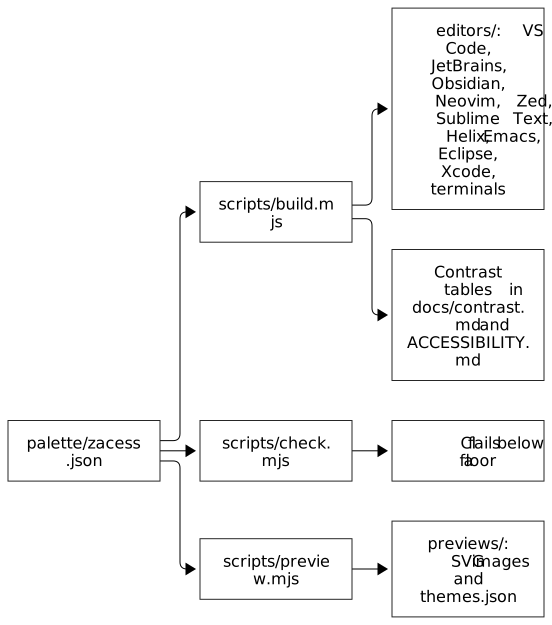
Diagram source, as text
flowchart LR
    Palette["palette/zacess.json"] --> Build["scripts/build.mjs"]
    Palette --> Check["scripts/check.mjs"]
    Palette --> Preview["scripts/preview.mjs"]
    Build --> Editors["editors/: VS Code, JetBrains, Obsidian, Neovim, Zed, Sublime Text, Helix, Emacs, Eclipse, Xcode, terminals"]
    Build --> Tables["Contrast tables in docs/contrast.md and ACCESSIBILITY.md"]
    Preview --> Previews["previews/: SVG images and themes.json"]
Check --> CI["CI fails below a floor"]palette/zacess.jsonholds every colour: the interface, the syntax tokens and the 16 terminal colours of each theme, the font style of each token, the pairs of tokens that must look different and the floors the checks enforce, with any text floor a theme sets for itself.palette/schema.jsondescribes its shape.npm run buildwrites every editor's files from the palette. The generated files are committed, so each folder undereditors/stands alone.npm run checkvalidates the palette against its schema, measures every colour against the floors in contrast.md and parses every generated file. It prints a table of every failure and exits non-zero.npm run previewdraws the SVG previews as real text in each theme's colours and writespreviews/themes.json, the data the themes page on the Zacess website is built from.npm run verifyruns the build and the previews again and fails if anything committed differs.
The checks need Node.js 24 and nothing else: the scripts have no dependencies.
Layout
| Path | What lives there |
|---|---|
palette/ |
The palette and its schema |
scripts/ |
The generator, the checks, the previews and their shared colour maths |
scripts/screenshot/ |
The Obsidian screenshots: a mock of an Obsidian window drawn from each theme's variables, rendered by Playwright with npm ci then node render.mjs in that folder |
editors/vscode/ |
The VS Code extension |
editors/jetbrains/ |
The JetBrains theme plugin and its Gradle build |
editors/obsidian/ |
The five Obsidian themes, one folder each with its manifest, stylesheet and README |
editors/neovim/ |
The Neovim colour schemes |
editors/zed/ |
The Zed theme extension |
editors/sublime/ |
The Sublime Text colour schemes |
editors/helix/ |
The Helix themes |
editors/emacs/ |
The Emacs themes |
editors/eclipse/ |
The Eclipse preference files, the Eclipse plugin and its Maven and Tycho build |
editors/xcode/ |
The Xcode themes |
editors/terminals/ |
Terminal.app, iTerm2, Ghostty, kitty, WezTerm, Warp, Alacritty and Windows Terminal themes, plus btop |
install.sh, install.ps1 |
The terminal installers |
previews/ |
The preview images and the data for the website |
assets/ |
The Zacess mark the icons are made from |